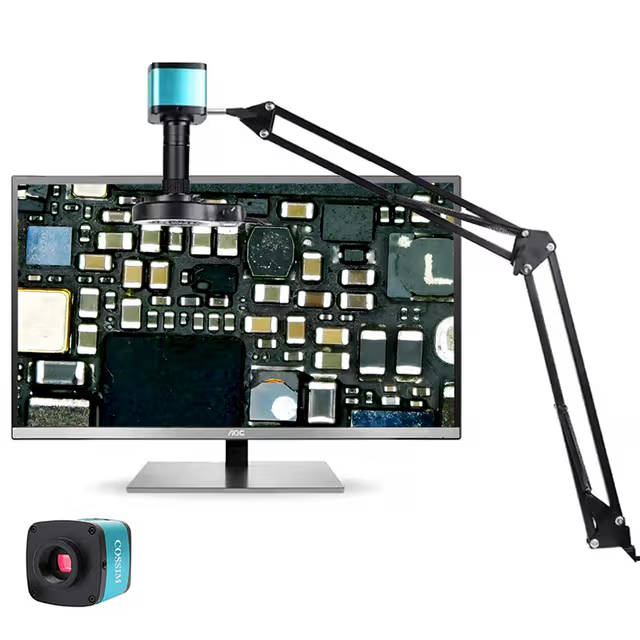
Ultra 4K IMX 1/1.8'' SONY CMOS Sensor Industrial Camera Digital Phone Repairing Electron Microscope HDMI Camera
4K industrial camera with Sony IMX CMOS sensor providing high-resolution microscopy imaging, HDMI output, and integrated software for research documentation and analysis.
| Automation Level | semi-automated |
| Product Type | Microscope Camera |
| Application | Industrial Inspection |
| Camera Resolution | 4K |
| Skill Level | Intermediate |
| Brand | ConductScience |

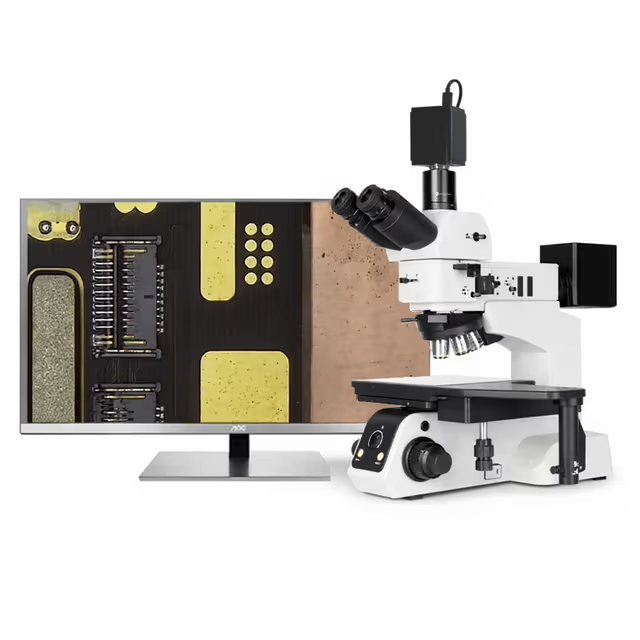
The Ultra 4K IMX Industrial Camera integrates a Sony IMX CMOS sensor with 1/1.8" format to deliver high-resolution digital imaging for microscopy and precision inspection applications. The system captures 4K (3840×2160) images at 30 FPS and 1080p video at 60 FPS through HDMI output, providing real-time visualization and documentation capabilities for research workflows.
The camera features manual and automatic exposure control with adjustable brightness and exposure time settings, complemented by RGB-adjustable white balance for accurate color reproduction. Integration with Claymore Microscope Software supports Windows 7-11 systems and enables direct image/video saving to USB storage or PC, facilitating seamless data collection and analysis protocols.
How It Works
The camera utilizes a Sony IMX CMOS sensor with 2.0μm × 2.0μm pixel geometry in a 1/1.8" format to capture incident light and convert photons to electrical signals. The CMOS architecture enables rapid readout with minimal noise, supporting both 4K (3840×2160) imaging at 30 FPS and HD (1920×1080) video at 60 FPS through integrated HDMI output.
Exposure control operates through electronic shutter timing adjustment, with automatic algorithms analyzing scene brightness to optimize exposure duration. Manual override allows precise control of exposure parameters for specialized lighting conditions or fluorescence applications. White balance correction processes RGB channel gains to compensate for illumination spectral characteristics, ensuring accurate color reproduction across different microscopy techniques.
The integrated Claymore software interface communicates with the camera through USB protocols, enabling real-time preview, image capture triggers, and direct file storage to connected drives or computer systems. The ICON-based menu system provides intuitive access to imaging parameters including contrast, saturation, and noise reduction algorithms optimized for microscopy applications.
Features & Benefits
Automation Level
- semi-automated
Product Type
- Microscope Camera
Application
- Industrial Inspection
Camera Resolution
- 4K
Skill Level
- Intermediate
Brand
- ConductScience
Research Domain
- Analytical Chemistry
- Cell Biology
- Environmental Monitoring
- Histopathology
- Materials Science
- Microbiology
- Pharmaceutical QC
Weight
- 0.2 kg
Dimensions
- L: 6.8 mm
- W: 5.8 mm
- H: 5.3 mm
Comparison Guide
| Feature | This Product | Typical Alternative | Advantage |
|---|---|---|---|
| Image Resolution | 4K (3840×2160) at 30 FPS with HD (1920×1080) at 60 FPS | Many microscopy cameras offer only HD (1920×1080) resolution or 4K at lower frame rates | Higher resolution enables detailed morphological analysis while maintaining smooth video capabilities for dynamic observations. |
| Sensor Technology | Sony IMX CMOS with 2.0μm × 2.0μm pixel size in 1/1.8" format | Entry-level cameras often use smaller sensors with larger pixel sizes | Larger sensor format with fine pixel geometry provides superior light collection and spatial resolution for microscopy applications. |
| Output Connectivity | HDMI with dual resolution modes plus USB for software control | Basic models may offer only USB connectivity requiring computer connection | Direct HDMI output enables standalone operation with monitors and eliminates computer bottlenecks during live imaging. |
| Software Integration | Dedicated Claymore Microscope Software with ICON menu interface | Generic cameras often require third-party software or basic capture applications | Purpose-built microscopy software streamlines workflow with optimized controls and eliminates compatibility issues. |
| Exposure Control | Auto/Manual modes with brightness and exposure time adjustment plus RGB white balance | Basic models typically offer limited exposure control options | Comprehensive exposure and color management accommodates diverse microscopy techniques from brightfield to fluorescence imaging. |
This camera combines 4K imaging capability with specialized microscopy software and flexible connectivity options. The Sony IMX sensor provides high-quality image capture while dual HDMI resolution modes optimize both static documentation and real-time observation workflows.
Practical Tips
Perform white balance calibration using a blank microscope field or neutral density reference under your specific illumination conditions before beginning experiments.
Why: Proper white balance ensures accurate color reproduction and consistent results across different imaging sessions.
Use manual exposure mode for fluorescence applications to maintain consistent signal intensity measurements across time-lapse experiments.
Why: Automatic exposure can compensate for photobleaching, masking actual signal changes in quantitative fluorescence studies.
Clean the camera sensor and lens surfaces monthly using appropriate optical cleaning materials and techniques to prevent dust accumulation.
Why: Dust particles on optical surfaces create artifacts in images and reduce overall image quality and contrast.
Save images in the highest available resolution even for routine documentation to preserve maximum detail for future analysis.
Why: Higher resolution images enable subsequent cropping, zooming, and detailed morphometric measurements that may not be initially planned.
If HDMI output displays no signal, verify the display monitor supports 4K resolution at 30 FPS or switch to HD mode for older monitors.
Why: Some older displays cannot handle 4K signals, causing blank screens despite proper camera function.
Establish consistent naming conventions and folder structures in the Claymore software for systematic data organization across projects.
Why: Organized file management prevents data loss and enables efficient retrieval of specific experiments or time points.
Ensure adequate ventilation around the camera housing during extended operation to prevent heat buildup in enclosed microscope systems.
Why: Excessive heat can affect sensor performance and potentially damage electronic components over time.
Setup Guide
What’s in the Box
- Ultra 4K IMX Industrial Camera
- DC 12V Power Adapter
- HDMI Cable
- USB Connection Cable
- C-Mount Adapter (typical)
- User Manual and Software Installation Guide
- Calibration Reference Card (typical)
Warranty
ConductScience provides a standard 1-year manufacturer warranty covering defects in materials and workmanship, with technical support for software installation and basic troubleshooting assistance.
Compliance
References
Background reading relevant to this product:
What is the maximum resolution and frame rate capability of this camera?
The camera captures 4K (3840×2160) images at 30 FPS and HD (1920×1080) video at 60 FPS through HDMI output, with both modes available for real-time visualization and recording.
How does the exposure control system work for different microscopy techniques?
The camera offers both automatic exposure with scene analysis and manual control with adjustable exposure time and brightness settings, accommodating brightfield, darkfield, and fluorescence microscopy requirements.
What software is required and which operating systems are supported?
Claymore Microscope Software is included and supports Windows 7, 8, 10, and 11 systems, providing comprehensive camera control and direct file saving capabilities.
Can images be saved directly without a connected computer?
Yes, the camera supports direct saving to USB drives as well as connected Windows PCs, enabling flexible data storage workflows in different laboratory setups.
How is white balance calibration performed for accurate color reproduction?
White balance operates in automatic mode, manual RGB adjustment, or one-key correction, allowing calibration against blank fields or reference standards for your specific illumination source.
What mounting options are available for different microscope systems?
The camera features a 1/1.8" lens mount compatible with standard C-mount adapters for integration with trinocular microscope ports and other optical systems.
Are there built-in image enhancement features?
Yes, the camera includes real-time adjustment of contrast, saturation, clarity, and noise reduction through the ICON-based menu system, optimizing image quality without post-processing.
What are the power requirements and connectivity options?
The camera requires DC 12V input power and connects via HDMI for display output and USB for computer control, with compact dimensions (6.8 × 5.8 × 5.3 cm) for easy integration.
Have a question about this product?
Accessories
Enhance your setup with compatible accessories
Frequently Bought Together
Related Products