ConductVision Annotator Software
Professional behavioral video annotation software for preclinical and translational research. Define custom ethograms, score timestamped behavioral events across multiple subjects and trials, and export structured CSV data — replacing manual...

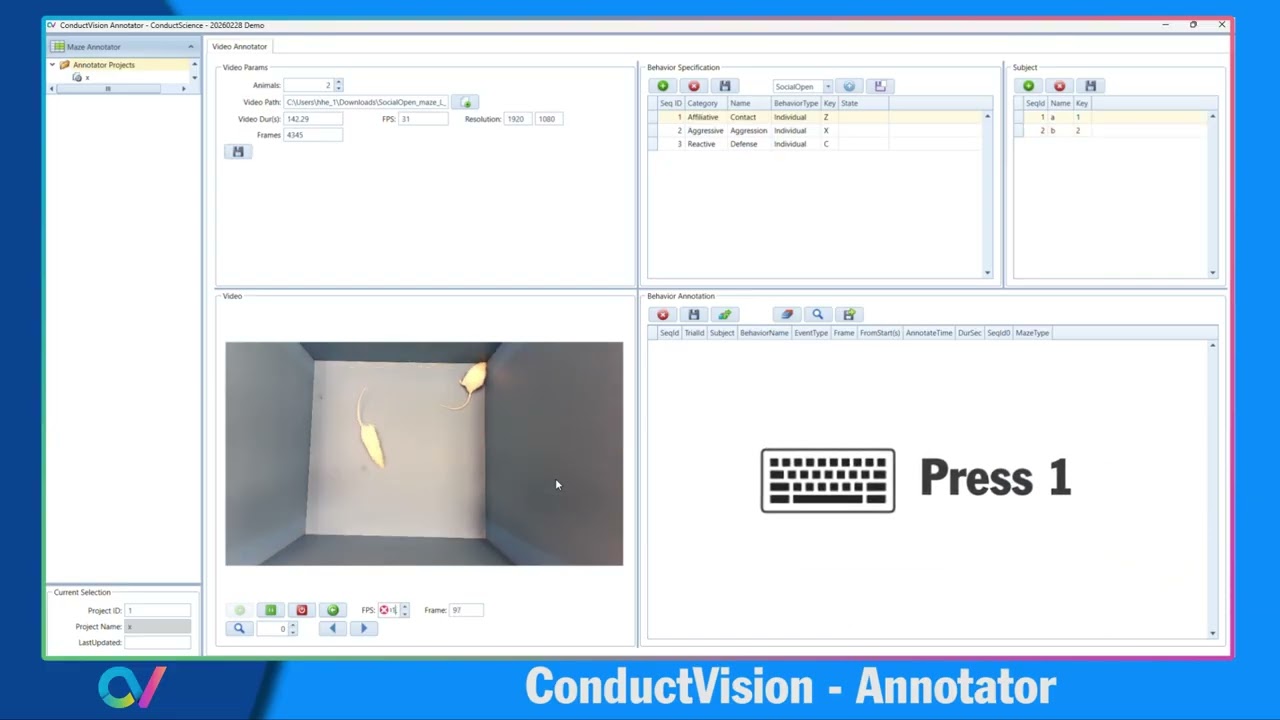
ConductVision Annotator is a desktop annotation platform purpose-built for behavioral neuroscience. Load any video file, define your ethogram, bind behaviors and subjects to hotkeys, and score observations with millisecond precision — all without taking your hands off the keyboard. Export analysis-ready CSV data directly from the annotation session.
How It Works
Features & Benefits
Weight
- 0.22 kg
Dimensions
- L: 25.0 mm
- W: 20.0 mm
- H: 5.0 mm
| Parameter | Specification |
|---|---|
| Platform | Windows 10 / 11 (64-bit) |
| Installation path | C:\appAnnotatorUI\bin\AnnotatorUI.exe |
| Supported video formats | MP4, AVI, MOV (and other system-codec formats) |
| Recommended frame rate | Constant frame rate (CFR); VFR not recommended |
| Max subjects per project | 9 (keyboard keys 1–9) |
| Behavior entries | Unlimited |
| Export format | CSV — Trial, Video, Subject, Behavior, Start Frame, Stop Frame, Start Time, Stop Time, Duration |
| Project file format | JSON (bin/_database/) |
| License type | Perpetual, single workstation |
| License file | LicenseVision.txt (same directory as executable) |
| Internet required | No — fully offline operation |
| Updates included | 6 months from activation date |
Comparison Guide
| Feature | This Product | Typical Alternative | Advantage |
|---|---|---|---|
| Annotation method | Keyboard hotkeys — no mouse required during live scoring | Manual stopwatch + paper log or spreadsheet | |
| Timestamp precision | Frame-level start and stop (sub-second) | Second-level with manual note-taking | |
| Multi-subject | Up to 9 subjects with number-key switching | Separate log files per animal | |
| Multiple trials | Built-in trial management within a single project | Separate files per trial, merged manually | |
| Data export | Structured CSV with frame, time, subject, behavior, duration | Manual spreadsheet with transcription risk | |
| Review & correction | In-app video replay and inline frame editing | Re-watch full video from scratch |
ConductVision Annotator replaces the error-prone paper-log workflow with a structured, keyboard-driven system that captures events at frame-level precision and exports directly to analysis-ready CSV.
Practical Tips
Bind all behaviors before the first annotation session
Why: Changing key assignments mid-project can introduce inconsistencies across trials
Use constant frame rate (CFR) video files
Why: Variable-frame-rate recordings from smartphones can cause timestamp errors — convert to CFR before loading
Score a shared calibration video before the study begins
Why: Agreement on the calibration set establishes the behavioral definition standard across all scorers
Save the annotation table every 10-15 minutes during long sessions
Why: The application does not auto-save; unsaved data is lost on unexpected close
Back up the JSON project file after each session
Why: The CSV export contains only the annotation table; the JSON contains your full ethogram, configuration, and all trial data
Setup Guide
What’s in the Box
- ConductVision Annotator Software (AnnotatorUI.exe)
- Single-workstation perpetual license (LicenseVision.txt)
- Behavior template library (.json format)
- User manual (PDF)
- Installation support via email
- 6 months free updates and bug fixes
Warranty
6-month software update and bug fix coverage from the date of activation. License is perpetual and workstation-specific. For license transfers or technical support, contact support@conductscience.com.
Can I annotate videos from any camera or recording system?
Yes. ConductVision Annotator loads standard video files (MP4, AVI, MOV) regardless of the recording hardware. The application reads Duration, FPS, Resolution, and Frame Count automatically on load.
How many behaviors can I define per project?
There is no hard cap. Define as many behaviors as your ethogram requires, either manually or from a saved template file (.json). Templates can be saved from any project for reuse across studies.
Can multiple scorers annotate the same video for inter-rater reliability?
Yes. Each scorer runs an independent annotation session or trial. Export both CSV files and compare them using Cohen's kappa, intraclass correlation (ICC), or percent agreement in your statistical software of choice.
Does the software require an internet connection?
No. ConductVision Annotator runs entirely offline. License activation uses the local LicenseVision.txt file — no internet validation is required after installation.
What video formats are supported?
MP4, AVI, and MOV, plus other formats compatible with the installed system codec. For best results, use constant frame rate (CFR) recordings. Variable frame rate (VFR) files from smartphone cameras may produce timestamp inconsistencies.
Can I correct a scoring mistake without re-doing the whole annotation?
Yes. The Frame column in the results table is directly editable. Change the frame number, then click Calculate to recompute timing. Use Search and Play to navigate to and replay any annotated event before or after editing.
Is ConductVision Annotator compatible with the ConductVision AI tracking modules?
Yes. It is designed as a companion tool. Use it to generate human ground-truth labels that validate automated tracking output, or to score behaviors outside the AI module's automated detection scope.
What does the CSV export include?
Trial, Video, Subject, Behavior, Start Frame, Stop Frame, Start Time (s), Stop Time (s), and Duration (s). The file opens directly in Excel, R, Python (pandas), SPSS, and GraphPad Prism without reformatting.
Can I score the same video more than once?
Yes. The Multiple Trials feature lets you annotate a video as many times as needed within one project. Each trial is stored separately and can be deleted independently.
Where is my data stored?
Annotation results are saved in the JSON project file under bin\_database\. The JSON contains your full configuration, ethogram, and all trial data. Always back up this folder — the CSV export is a snapshot, not the primary data store.
Have a question about this product?