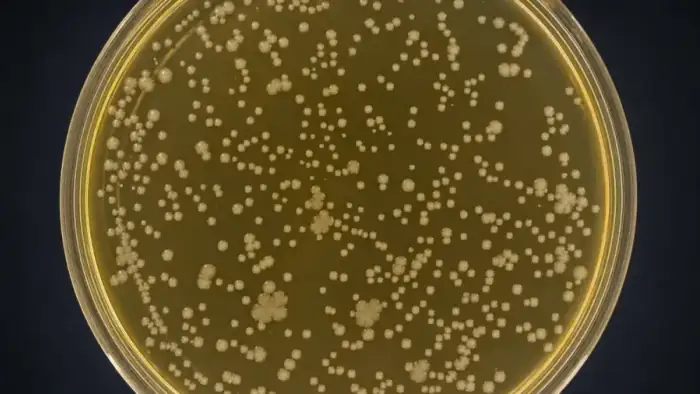
Plaque assay counting image analysis for viral plaques.
Count plaques and quantify plaque area from plate or well images.
What this page covers
Use this page when the assay endpoint is plaque count, plaque size, lysis area, or PFU-style calculation from plate images.
Talk through your images
Share plate images, staining method, dilution structure, and how your team handles merged or diffuse plaques.
Request a meetingMeasurements
- Plaque count
- Plaque area
- Diameter
- PFU-style summary
- Dilution comparison
- Merged plaque flag
Review outputs
- Plaque overlays
- Plate maps
- Dilution tables
- QC exports
Image inputs, QC, and outputs
Use this section to decide whether the page matches your assay before requesting a meeting. The goal is to preserve the biological endpoint while making the image analysis repeatable, reviewable, and exportable.
Image inputs
Application analysis starts with representative images that match the endpoint your lab reports. Include controls and edge cases so thresholds can be set against real biological variation, not only ideal fields.
- Primary measurements: Plaque count, Plaque area, Diameter, and PFU-style summary
- Matched positive and negative controls when available
- Consistent magnification, channel order, plate layout, or time-point labels
QC and validation
Each workflow should leave a visible trail from raw image to measurement. Review masks, thresholds, and flagged fields before exporting the final table.
- Raw image and overlay review before batch export
- Locked settings for repeated plates, stains, or time points
- QC flags for dim signal, merged objects, uneven background, or failed segmentation
Outputs for analysis
ConductVision should return both visual evidence and structured data so the result can be checked, summarized, and reused in downstream statistics.
- Typical outputs: Plaque overlays, Plate maps, Dilution tables, and QC exports
- Per-image, per-cell, per-object, or per-well tables where relevant
- CSV exports for Prism, Excel, R, Python, or LIMS handoff
Workflows to start from
Open an existing ConductVision page when the workflow already exists, or request a meeting when your assay needs custom thresholds, outputs, or validation rules.
Related Life Science pages
Use these pages to move between adjacent assays, specialist microscopy workflows, and the full Life Science atlas.
Request a Life Science meeting
Share your assay, representative images, and the measurement you need so the team can map the closest ConductVision workflow.
Cell assays
Open adjacent plate image-analysis workflows.
Life Science atlas
Return to the full biology application atlas for cells, assays, tissue, microscopy, and morphology.
Frequently asked questions
These answers cover the practical questions labs usually ask before sending example images or requesting a ConductVision workflow review.
What images work best for application analysis?
Use representative images from the same microscope, scanner, plate reader, or camera setup used in the study. The most useful examples include controls, typical fields, difficult fields, and any cases that affect Plaque count, Plaque area, Diameter, and PFU-style summary.
Can ConductVision handle custom application endpoints?
Share plate images, staining method, dilution structure, and how your team handles merged or diffuse plaques. ConductScience can confirm whether an existing workflow fits or define custom segmentation, thresholding, review, and export rules for the assay.
What results are usually exported from this workflow?
The expected deliverables include Plaque overlays, Plate maps, and Dilution tables, plus structured tables for downstream analysis. The page also lists the specific measurements and review outputs that are most relevant to this application.
Find out if ConductVision fits your application workflow
Send representative images, assay details, and the measurement endpoint. ConductScience can confirm the closest existing workflow or scope a custom analysis path.