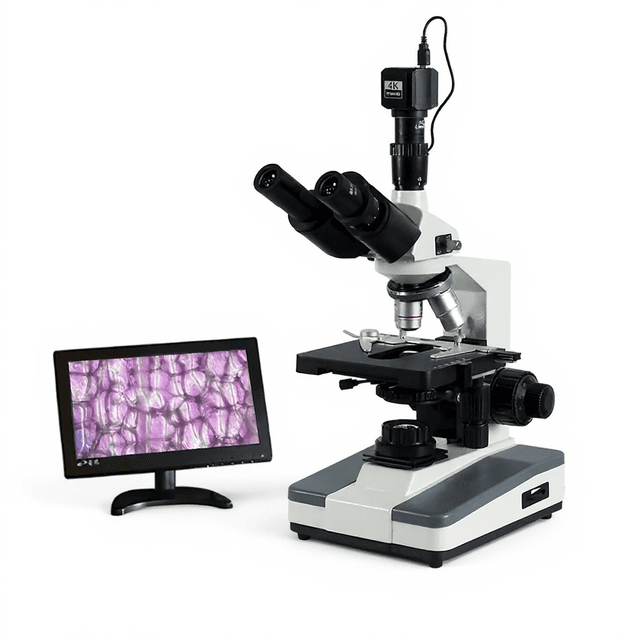
SONY Sensor 60 FPS HDMI & USB3.0 Industrial Microscope Camera for Measuring with GigE port
Industrial-grade 4K microscope camera with SONY sensor providing 60 FPS imaging at 3840×2160 resolution through multiple interfaces including HDMI, USB3.0, and GigE for quantitative microscopy applications.

Louise Corscadden, PhD
Director of Science · ConductScience
Ask Louise about SONY Sensor 60 FPS HDMI & USB3.0 Industrial Microscope Camera for Measuring with GigE port fit, setup, configuration, or quote prep.
Already working with us? Sign in to connect this with My Scientist.
Key Specifications
Full details →- Model fit
- Configured during quote
- SKU family
- MCX-0049
- Shipping box
- 4.9 x 6.6 x 6.6 cm
- Ordering
- Online checkout and quote request available
- Category
- Microscopy
- Build notes
- Confirm accessories, station layout, and support needs before purchase
The HD-4KR industrial microscope camera integrates a high-resolution SONY sensor with multiple interface options for quantitative imaging applications. The system captures 4K resolution (3840 x 2160) at 60 FPS through HDMI 2.0, USB3.0, and Gigabit Ethernet connections, providing flexibility for different microscopy workflows and data acquisition requirements.
Built around a quad-core ARM Cortex processor with 4GB LPDDR4X memory, the camera processes 12-bit color data with 2.0μm pixel resolution on a 1/1.8" sensor format. The rolling shutter mechanism and integrated processing capabilities support real-time imaging for morphometric analysis, quality control measurements, and documentation in laboratory and industrial environments.
How It Works
The HD-4KR utilizes a SONY CMOS sensor with 2.0μm pixel pitch to capture light transmitted or reflected through microscope optics. The 1/1.8" sensor format provides a field of view optimized for standard microscopy magnifications while maintaining high spatial resolution across the 3840 x 2160 pixel array.
Image processing occurs through a quad-core ARM Cortex processor operating at 1.8GHz with dedicated Neon acceleration and floating-point processing capabilities. The system converts analog sensor signals to 12-bit digital data, enabling 4096 gray levels per color channel for enhanced dynamic range in brightfield and contrast imaging modes.
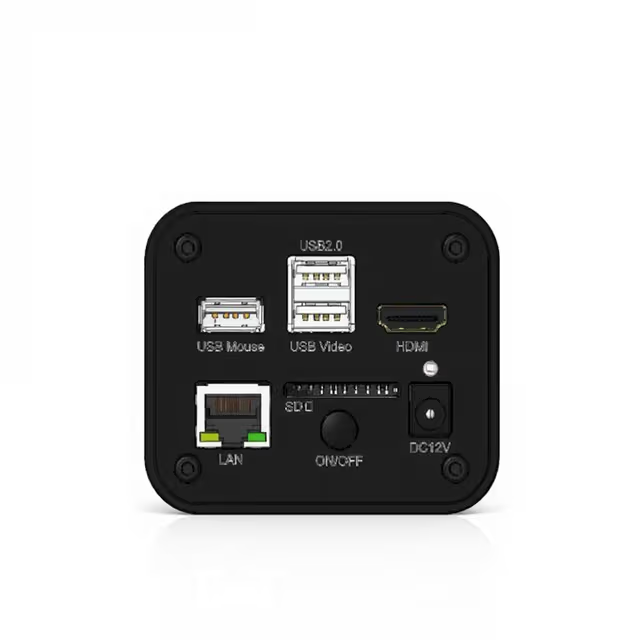
Data transmission utilizes three parallel interfaces: HDMI 2.0 for real-time display, dual USB3.0 connections for high-speed file transfer, and Gigabit Ethernet for network integration. The rolling shutter readout mechanism scans pixel rows sequentially at 60Hz, suitable for static specimens and moderate-speed processes while minimizing motion artifacts in most microscopy applications.
Features & Benefits
Automation Level
- semi-automated
Product Type
- Microscope Camera
Application
- Industrial Inspection
Camera Resolution
- 4K
Connection Interface
- HDMI
- USB 3.0
Skill Level
- Intermediate
Brand
- ConductScience
Research Domain
- Analytical Chemistry
- Environmental Monitoring
- Food Science
- Histopathology
- Industrial Hygiene
- Materials Science
- Microbiology
- Pharmaceutical QC
Shipping weight
- 1.9 lb
Shipping box
- L: 4.9 cm
- W: 6.6 cm
- H: 6.6 cm
| Feature | This Product | Typical Alternative | Advantage |
|---|---|---|---|
| Resolution | 3840 x 2160 (4K) | Many entry-level models offer 1920 x 1080 or lower resolution | Higher pixel density enables more precise measurements and better documentation of fine specimen details. |
| Frame Rate | 60 FPS | Budget cameras often limited to 30 FPS or lower | Smoother real-time operation reduces time spent on focus and positioning adjustments. |
| Interface Options | HDMI 2.0, dual USB3.0, and GigE | Basic models typically offer only USB or single interface | Multiple simultaneous connections support complex workflows with display, data acquisition, and network integration. |
| Color Depth | 12-bit processing | Entry-level cameras often use 8-bit processing | Increased dynamic range improves contrast resolution for better discrimination of specimen features. |
| Processing Power | Quad-core ARM Cortex with dedicated acceleration | Basic cameras rely primarily on host computer processing | On-board processing reduces computer resource requirements and enables standalone operation modes. |
| Pixel Size | 2.0μm x 2.0μm | Varies by sensor design and cost target | Optimized pixel pitch balances resolution with light sensitivity for microscopy applications. |
The HD-4KR combines high-resolution 4K imaging with robust processing capabilities and flexible connectivity options. The SONY sensor and multiple interface design provide comprehensive imaging capabilities suitable for demanding microscopy applications requiring both real-time operation and detailed documentation.
Practical Tips
Perform pixel calibration with a certified stage micrometer at each objective magnification you plan to use, and save these calibrations in your imaging software for consistent measurements.
Why: Accurate pixel-to-distance conversion is essential for reliable morphometric data and ensures measurement repeatability across sessions.
Keep the sensor surface clean using appropriate optical cleaning materials and avoid touching the glass window during camera installation or removal.
Why: Dust or fingerprints on the sensor directly affect image quality and can create artifacts in quantitative measurements.
Use the GigE interface for automated acquisition workflows and reserve USB3.0 for interactive sessions requiring maximum responsiveness.
Why: Different interfaces have distinct latency and bandwidth characteristics that affect user experience and data throughput.
Set exposure time to avoid saturation in your brightest specimen areas while maintaining adequate signal in darker regions, utilizing the full 12-bit dynamic range.
Why: Proper exposure maximizes the information content in your images and prevents data loss from clipping in bright or dark areas.
If experiencing frame drops during high-speed acquisition, check USB3.0 cable quality and length, and verify computer USB controller specifications.
Why: High-bandwidth 4K data streams are sensitive to cable quality and USB controller capabilities, which can limit actual transfer rates.
Ensure adequate ventilation around the camera housing during extended operation and verify the 12V power supply meets the specified current requirements.
Why: The processing electronics generate heat during operation, and inadequate power supply can cause system instability or damage.
Configure image compression settings based on your analysis needs - use uncompressed formats for quantitative measurements and compressed formats for documentation.
Why: Compression can introduce artifacts that affect measurement accuracy, while uncompressed files provide maximum data integrity at the cost of storage space.
Document your optical setup including objectives, tubes lenses, and any additional optics when saving calibration data for future reference.
Why: Measurement accuracy depends on the complete optical path, and changes to any component require recalibration for reliable quantitative results.
Setup Guide
What’s in the Box
- HD-4KR microscope camera (typical)
- 12V DC power adapter (typical)
- HDMI cable (typical)
- USB3.0 cable (typical)
- Ethernet cable (typical)
- C-mount adapter (typical)
- Installation software disc (typical)
- User manual and quick start guide (typical)
Warranty
ConductScience provides a standard one-year manufacturer warranty covering defects in materials and workmanship, with technical support for installation and operational guidance.
Compliance
References
Background reading relevant to this product:
What magnifications work best with the 2.0μm pixel size?
The 2.0μm pixel pitch is optimal for 10x to 40x objective magnifications, providing good sampling of microscopic features without oversampling. Higher magnifications may require pixel binning for optimal signal-to-noise ratio.
Can the camera handle brightfield, darkfield, and phase contrast techniques?
Yes, the 12-bit color sensor and processing capability support all standard optical microscopy techniques. Rolling shutter design works well for static specimens in any contrast method.
What software is compatible with the multiple interface options?
The camera interfaces with most microscopy software packages supporting standard USB Video Class or GigE Vision protocols. HDMI provides direct display while USB3.0 and GigE enable computer-controlled acquisition.
How does the 60 FPS rate benefit measurement applications?
High frame rate enables smooth real-time focusing and specimen positioning, reducing the time needed to locate and frame measurement areas. It does not increase measurement accuracy but improves workflow efficiency.
What are the network capabilities through the GigE interface?
Gigabit Ethernet enables remote operation and centralized data storage, particularly useful for multi-user facilities or automated acquisition systems requiring network-based control and data management.
Is the rolling shutter suitable for dynamic processes?
Rolling shutter is designed for static specimens and moderate dynamics. For fast-moving processes or vibration-sensitive applications, consult product datasheet for specific motion blur specifications.
What calibration procedures are needed for quantitative measurements?
Use a certified stage micrometer to establish pixel-to-distance conversion factors at each magnification. Recalibration is recommended when changing objective lenses or camera positioning.
How much data storage is required for typical imaging sessions?
4K uncompressed images generate approximately 24MB per frame. Plan storage capacity based on session length, compression settings, and whether you need RAW or processed image formats.
Have a question about this product?
Have a question? Just ask.
Send it over and we'll email you a personalized answer — no call, no scheduling.
Prefer to talk it through?
Accessories
Enhance your setup with compatible accessories
Frequently Bought Together
Related Products