ConductVision Enterprise

People Detection

ConductVision counts the people in each camera view and the people crossing each entrance, hour by hour, for teams that run stations, stores, offices and venues.

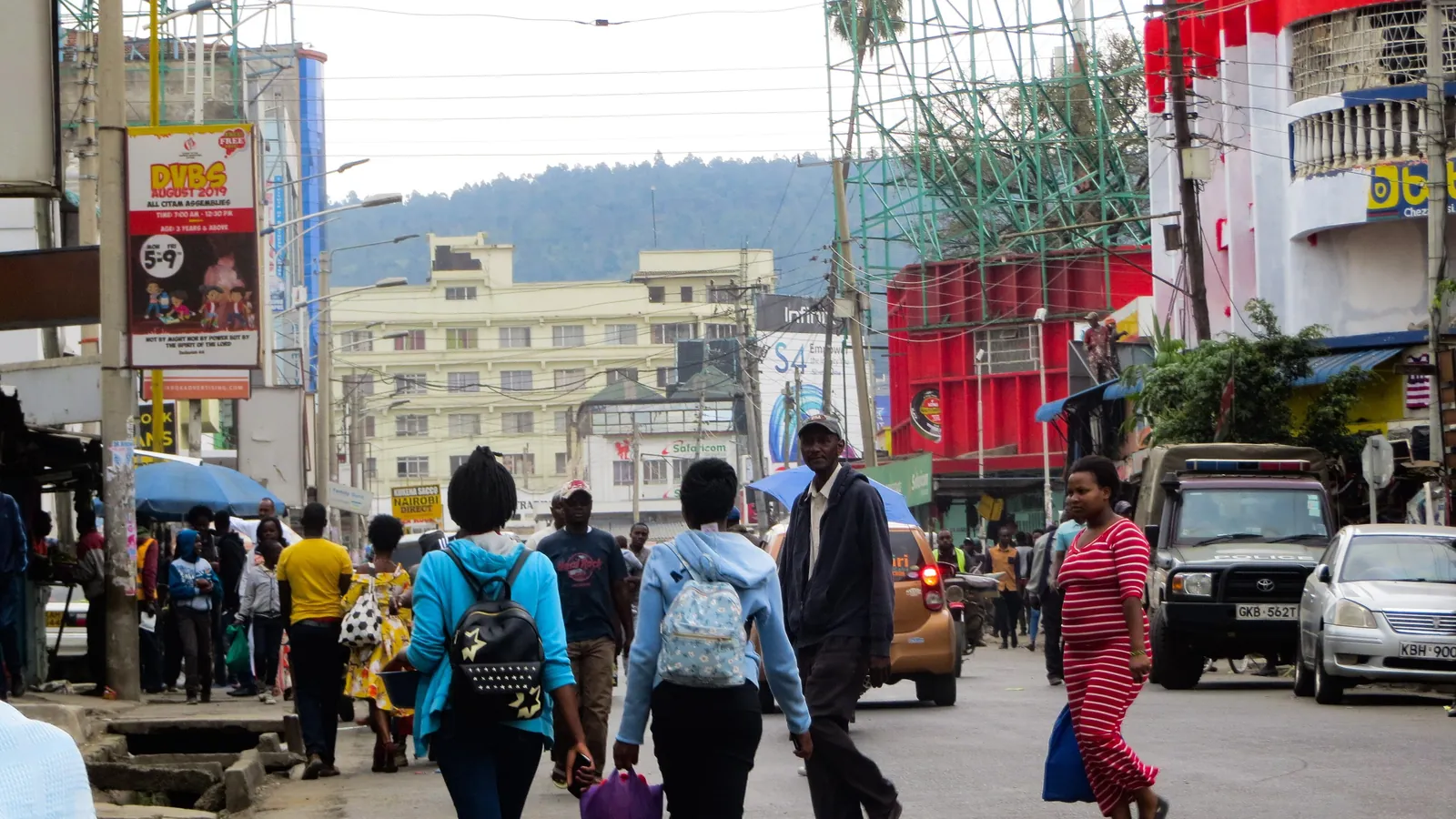
A busy shopping street in Nakuru, Kenya, with people walking between shops and parked cars; boxes mark 20 pedestrians.20 detections
Busy street in Nakuru
  • Person20

ConductVision detections on this photo. Photo: Victor Kibiwott, CC BY-SA 4.0, cropped.

People Detection transforms standard surveillance cameras into intelligent occupancy sensors. The system is designed to count individuals, measure crowd density, track movement paths across zones, and identify events such as falls or sudden congregations. Built for facilities of any size, it can scale across many concurrent video streams. Whether you are managing a retail floor, a transit hub, or a research facility, the platform delivers continuous, privacy-respectful analytics without requiring specialized hardware.

Outcomes

What your team gets

Entrance counts through the rush

Staff with hand clickers stop counting when the doors get busy.

The busiest hours, the ones that set staffing and cleaning plans, end up with the weakest counts.

How
In a pilot, ConductVision counts each tracked person once as they cross a line drawn across the entrance.
You get
Entries and exits by entrance for every hour the doors are open.

How much each space is used

Meeting rooms, lobbies and floors get planned around how busy they seem.

Rooms that stand empty for much of the day still get heated, cleaned and booked.

How
ConductVision counts the people inside each room or zone in every sampled frame, seated or standing.
You get
Hourly headcounts per room or zone, with the daily peak and the hours each space was in use.

Which doors people use

Buildings with several entrances rarely know which door most people use.

Signs, staff and cleaning go to the main door by habit.

How
ConductVision applies the same counting rule at every entrance it covers.
You get
Each door's share of entries by hour and weekday.

Counts you can check

A count from a ceiling sensor is hard to trust when it disagrees with sales or badge records.

Teams argue over whose number is right, and the count stops being used.

How
Every count keeps the frames behind it, with a box drawn on each person counted.
You get
A frame-by-frame record that a manager can check against the footage for any hour.

What the model sees

Detections in two more settings

A pedestrian crossing on a snowy town square in Tomaszów Mazowiecki, Poland; boxes mark three people walking through falling snow.
Town square in snow
  • Person3

ConductVision detections on this photo.

An overhead view of the crosswalk at Market and Third Streets in San Francisco; boxes mark two cyclists on the crossing and two pedestrians on the sidewalk.
Market Street crosswalk from above
  • Person4

ConductVision detections on this photo. Photo: Dllu, CC BY-SA 4.0, cropped.

Endpoints

What a pilot measures

Each endpoint is defined before the pilot starts, with what is counted, its unit and how the results are broken down.

What a pilot measures
PrimaryEntries by entrancePeople who cross an entrance line inward, counted once per crossing and summed by hour.Unit:entries per hourBy:Entrance, weekday
SecondaryPeak occupancyHighest number of people counted inside a zone in any sampled frame of the day.Unit:peopleBy:Zone, day
Hours in useShare of open hours in which at least one person is counted inside the zone.Unit:%By:Zone, week
Door shareEntries through one door as a share of entries through all doors of the building.Unit:%By:Door, hour

How we check the model

Each pilot measures ConductVision on your own footage against a sample checked by hand, before anyone relies on its numbers.

  • Entry count agreement

    Difference between the ConductVision entry count and a reviewer's hand count for the same sampled hours.

    entries per hour (mean absolute difference) · by entrance, crowd level

  • Missed people

    Share of people a reviewer marks in sampled frames that ConductVision did not box.

    % · by camera, distance from camera

  • Double counts

    Crossings counted twice for one person, such as when a track breaks and restarts, per 100 reviewed crossings.

    per 100 crossings · by entrance

How it works

People Detection in three steps

  1. Connect

    Connect Your Cameras

    Add any IP camera via RTSP or ONVIF discovery. The platform auto-detects resolution, frame rate, and orientation so you can start analyzing within minutes.

  2. Analyze

    AI Processes Every Frame

    A lightweight detection model runs inference on each frame, identifying individuals and estimating their position in 3D space. Tracking algorithms link detections across frames to build continuous movement trajectories.

  3. Act

    Trigger Actions and Alerts

    When occupancy thresholds are crossed or specific events occur, such as a fall or a queue exceeding a defined length, the system fires alerts via webhook, MQTT, or email. All events are logged with frame snapshots for audit.

What it detects

Classes the models report

  • Person

    Each person in view, boxed in every frame whether walking, standing or seated

  • Person track

    One ID per person from entering the view to leaving it

  • Line crossing

    Each crossing of an entrance line, in or out

  • Zone headcount

    People inside each drawn zone, per frame

  • Body pose

    Standing, seated or lying, from pose keypoints where a task needs posture

Features

What the system does

Occupancy Counting
Bidirectional counters at entry/exit points maintain real-time occupancy numbers with automatic drift correction throughout the day.
Crowd Density Mapping
Heat maps visualize crowd concentration across defined zones, updated every second. Useful for capacity planning and congestion avoidance.
Movement Path Analysis
Tracks anonymized trajectories to reveal common routes, dwell times, and bottlenecks. Data exports in standard formats for spatial analytics tools.
Fall Detection
Pose-estimation models identify sudden vertical-to-horizontal transitions indicative of a fall, triggering alerts to designated responders.
Queue Length Estimation
Automatically detects and measures queues at service points, estimating wait times and alerting when thresholds are exceeded.
Zone-Based Dwell Time
Define regions of interest and measure how long individuals remain within them. Useful for retail engagement analysis and restricted-area monitoring.
Privacy-First Processing
Optional face-blurring and skeleton-only modes ensure compliance with privacy policies. No biometric data is stored unless explicitly configured.

Use cases

Where teams put it to work

Retail Foot Traffic Analysis

Retailers often struggle to understand in-store customer flow. People Detection can map movement patterns across aisles and departments, providing data to optimize store layout and staffing schedules.

retail

Transit Station Crowd Management

Transit authorities need to prevent dangerous overcrowding on platforms. Real-time density mapping can trigger alerts when platform occupancy approaches capacity, enabling proactive crowd control measures.

smart citytransportation

Workplace Occupancy Compliance

Facilities managers must maintain occupancy limits in conference rooms and open offices. Automated counting can provide live dashboards and historical reporting without manual check-ins.

corporatereal estate

Elder Care Fall Response

Falls in assisted-living facilities often go unnoticed for critical minutes. Fall detection can send alerts to on-duty staff, reducing response times from minutes to seconds.

healthcaresenior living

Event Venue Capacity Management

Large venues need to monitor entry rates and zone densities during events. Bidirectional counting and density mapping can ensure that no area exceeds safe capacity.

eventshospitality

Research Facility Access Monitoring

Laboratories require accurate records of who enters controlled areas and when. People Detection can provide timestamped entry/exit logs without requiring badge swipes at every threshold.

researchmanufacturing

License Plate Gate Access

The challenge

Gate access systems that rely solely on keycards or remotes are vulnerable to lost, shared, or cloned credentials.

How ConductVision helps

ConductVision can read license plates at gate approaches and match them against an authorized vehicle list. Gates can open automatically for recognized vehicles, and unrecognized plates can be logged with timestamps and images for security review.

logisticssmart cityreal estate

Facial Verification

The challenge

Badge-based access can be defeated by sharing or theft, and security desks cannot verify every individual during peak entry periods.

How ConductVision helps

The platform can perform opt-in facial verification at access points, matching entering individuals against an enrolled database. This adds a biometric layer to existing badge systems, and all processing can occur locally with no cloud transmission of biometric data.

healthcaremanufacturingsmart city

Badge and Credential Verification

The challenge

Visual verification of badges, permits, and credentials at checkpoints is slow and subjective, especially for temporary or contractor passes.

How ConductVision helps

ConductVision can read badge text, QR codes, and permit numbers using OCR, cross-referencing against active credential lists. Expired or invalid credentials can be flagged for review, reducing checkpoint processing time while improving accuracy.

constructionmanufacturinghealthcare

Tailgating Detection

The challenge

Tailgating through secured doors, where an unauthorized person follows an authorized badge holder, undermines the entire access control system.

How ConductVision helps

The platform can count the number of people passing through a door after each badge swipe. If more than one person enters on a single credential, the system can alert security with video evidence, deterring casual tailgating and identifying repeat offenders.

smart cityhealthcaremanufacturing

Visitor Management

The challenge

Tracking visitors through a facility after they pass the front desk is difficult, and ensuring they remain in authorized areas requires escort or honor-system compliance.

How ConductVision helps

ConductVision can track visitor movement through camera views, verifying that visitors remain in escorted or authorized zones. If a visitor enters a restricted area, the system can alert security with the visitor location and the nearest escort point.

healthcaremanufacturingsmart city
Technical overview

Inputs, outputs and hardware

Accuracy and speed are measured on your footage and cameras during the pilot, and reported with the conditions they were measured under.

Models
Person detector and multi-object tracker (YOLO family), with pose keypoints where a task needs posture
Input formats
RTSP, ONVIF, MP4, HLS, MJPEG
Output formats
JSON, MQTT, Webhooks, CSV, Prometheus metrics
Hardware
NVIDIA Jetson (Orin/Xavier), Intel NUC, any x86 with CUDA-capable GPU

Pilot

Evaluate people detection on your footage

A pilot takes one prioritized outcome, runs on your cameras, reports the endpoints above and ends with a results review and a decision.